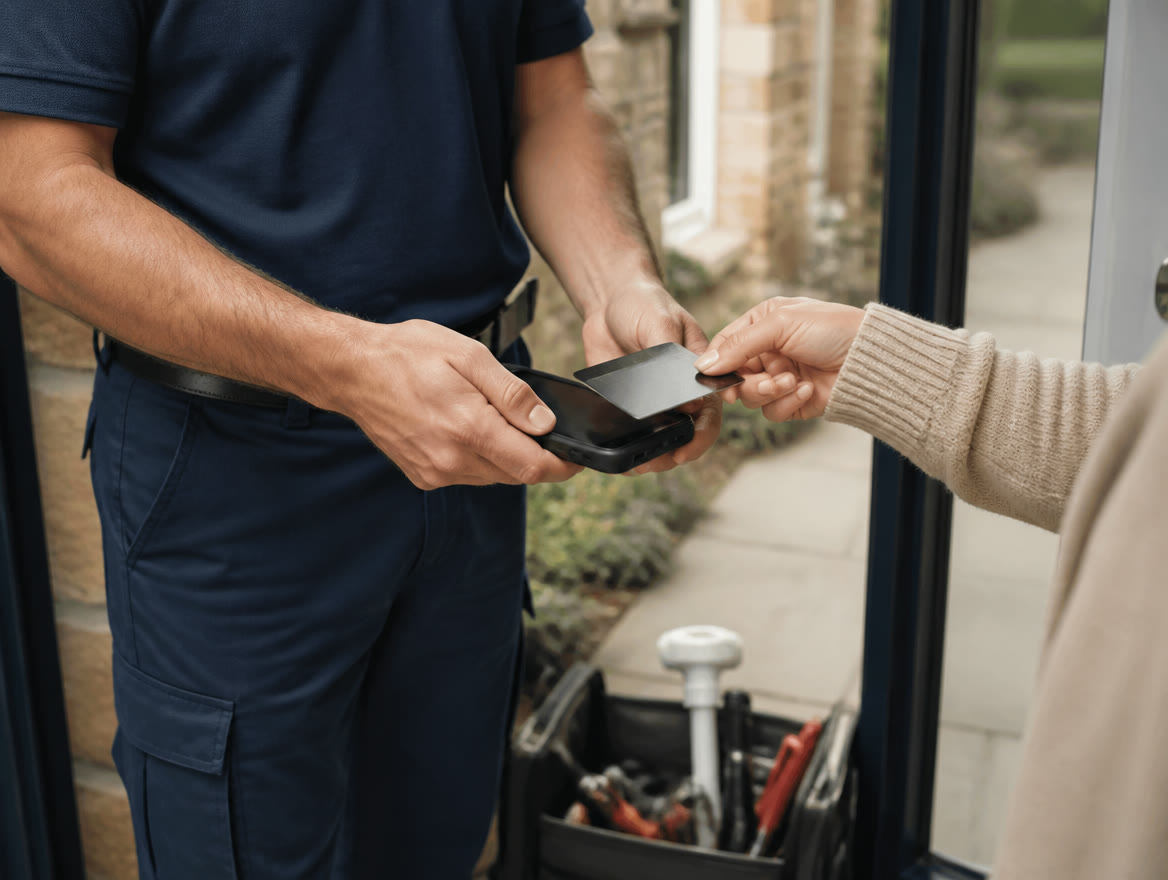
Square suits many service businesses because one account handles estimates, contracts, invoices, online booking and card payments, at $0 a month on Square Free. Square for contractors centers on estimates, deposits and progress billing; Square for nonprofits centers on in-person and online donations and a donor list. Square’s published pricing, checked October 2026 and subject to change, is 2.6% + 15¢ per in-person tap, dip or swipe and 3.3% + 30¢ per online or invoice card payment on Square Free. Milestone billing, no-show fees, class booking and staff tools start at Square Plus, $49 a month per location.
How does Square for contractors handle estimates, deposits and progress billing?
For most small contractors and remodelers, it handles all three well, as long as you bill by estimate and invoice rather than at a counter. Customers can pay by card, Apple Pay, Google Pay, Cash App Pay, ACH or Afterpay, and one invoice can run up to $1 million, with partial payments of up to $50,000. Our guide covers when to push ACH on invoices.
Estimates, e-signature contracts, deposits, automatic reminders and the project workspace come with every plan, including Square Free. Milestone payment schedules, multi-package estimates and automatic estimate-to-invoice conversion need Plus or Premium. Square’s free contract templates include one for Texas home improvement work, though Square notes it isn’t a law firm.
The table after these steps runs the arithmetic on a $12,000 remodel paid out to an outside bank, leaving out the plan fee ($49 a month per location for Plus, $149 for Premium). Square lists $0 ACH fees on every plan, Square Free included, when ACH payments are deposited into Square Checking. More on our Square Invoices page.
- Quote: Build the estimate in the Square Invoices app or Square Point of Sale, then send it by email, text or link.
- Sign and deposit: Attach a contract for e-signature and request a deposit before you order materials.
- Progress bills: On Plus or Premium, split the balance into milestones by percentage or dollar amount on one invoice.
- Get paid: Standard bank transfers are free the next business day; ACH payments reach your Square account in two to three business days.
| How the customer pays | Square Free | Square Plus or Premium |
|---|---|---|
| Card, one $12,000 invoice | 3.3% + 30¢ = $396.30 | 2.9% + 30¢ = $348.30 |
| Card, three $4,000 payments | $396.90 (three card payments, no milestone schedule) | $348.90 (one milestone schedule) |
| ACH, one $12,000 invoice | 1% = $120.00 | 1%, capped at $10 = $10.00 |
| ACH, three $4,000 payments | 3 × $40 = $120.00 | 3 × $10 cap = $30.00 |
Afterpay can’t be used on recurring invoices or payment schedules, and invoices sent by text don’t support automatic reminders. If reminders do your collecting, send the invoice by email.
How does Square for home services work in the field?
HVAC, plumbing, electrical, cleaning and landscaping crews need to take a card at the job and bill on a schedule. Square’s home and repair tools cover both: in-field payments in the Square Point of Sale app, cards on file and recurring invoices with automatic reminders for maintenance plans.
Appointment-driven crews like house cleaners can add a free 24/7 booking site with recurring appointments. A formal cancellation and no-show fee policy needs Square Plus or Premium, and charging a saved card costs 3.5% + 15¢.
Hardware needs are light. Our Square card reader guide covers setup.
| Option | Price | Good to know |
|---|---|---|
| Tap to Pay on iPhone | No hardware | iPhone XS or newer; no offline payments |
| Tap to Pay on Android | No hardware | Most NFC phones on Android 9 or later; no offline payments |
| Square Reader for contactless and chip | $59 | Pairs with your phone by Bluetooth; optional offline payments for up to 24 hours, at your risk |
On rural jobs with spotty signal, keep a Square Reader in the truck and turn on offline payments before you need them. Square declines offline payments if the device doesn’t reconnect within 24 hours, you’re responsible for any that expire, decline or are disputed, and Square can’t give you the customer’s contact details for one declined offline. On big tickets, send an invoice instead. More in our field service payments guide.
What does Square for professional services look like?
Square pitches this setup to accountants, lawyers, consultants and photographers: invoices, estimates, e-signature contracts, booking with automated reminders and Virtual Terminal, with no long-term commitment. Square Invoices connects to QuickBooks Online and Xero.
Virtual Terminal turns a browser on Windows or Mac into a card terminal for payments by phone, mail, text or email. Typed-in cards cost 3.5% + 15¢.
Retainers can run on recurring invoices set to charge a card on file automatically. Square’s table lists card-on-file payments at 3.5% + 15¢ but invoice card payments at 3.3% + 30¢ (Free) or 2.9% + 30¢ (Plus), so confirm which rate applies before moving clients over.
Is Square for healthcare practices and fitness studios a good fit?
Square for healthcare is about payments and scheduling, not charting. Square lists PCI-compliant hardware, Virtual Terminal, recurring payments, invoices, and booking tools that attach patient files and automate reminders, naming dentists, optometrists, dermatology centers and clinics as typical users. New to PCI? Start with our PCI basics for small businesses.
Licensed providers can run HSA and FSA cards at the standard rate, given on Square’s healthcare page as 2.6% + 15¢ in person. Practice software connects through integrations Square names, such as Noterro, Remedly, ClinicSense, EZDERM and Jotform.
Square for fitness covers recurring class schedules, instructor assignments, client profiles with progress notes, and sessions booked 24/7 from a free booking site, with payment at booking to cover no-shows. Class booking, packages and staff tools like timecards and commissions need Square Plus or Premium; see Square Appointments.
Square Subscriptions can bill memberships monthly or annually but doesn’t track entitlements like class counts, so sell class packs as packages. Square’s fitness page also shows lower Plus and Premium prices ($29 and $69 per location) than its main pricing page ($49 and $149); confirm before you subscribe.
Before storing patient details in booking notes or customer profiles, read Square’s HIPAA support article and confirm with your compliance advisor.
How does Square for nonprofits handle donations?
Square’s nonprofit page is about taking gifts. Your team can collect donations with a Square Reader and the Square Point of Sale app, keep taking payments offline when there’s no signal (at your risk if one declines), and group donors as loyal, casual or lapsed in the customer directory.
Online, a donation payment link takes donor-entered amounts, comes with a QR code for printed materials and can be reused by any number of donors. For recurring gifts, Square suggests Square Subscriptions, which has no monthly cost. Selling subscriptions on a Square website is a Plus or Premium feature; a payment link set to recur is another route to monthly gifts, so confirm which works on your plan.
We found no separate nonprofit discount on Square’s pages: the nonprofit page lists Square Free’s standard rates, shown below. Donor email campaigns need Square Plus or Premium (see Square marketing).
| How the gift is given | Rate | $50 gift | $500 gift |
|---|---|---|---|
| Tap, dip or swipe in person | 2.6% + 15¢ | $1.45 | $13.15 |
| Card online or by invoice | 3.3% + 30¢ | $1.95 | $16.80 |
| Card typed in over the phone | 3.5% + 15¢ | $1.90 | $17.65 |
| ACH bank transfer by invoice | 1%, $1 minimum | $1.00 | $5.00 |
Invoice big sponsorships and invite payment by ACH. Square lists $0 ACH fees on every plan, Square Free included, when the payment is deposited into Square Checking; otherwise it’s 1% ($1 minimum), capped at $10 on Plus or Premium. See Square banking.
Which Square plan fits a service business: Free, Plus or Premium?
Start on Square Free unless a feature or the math says otherwise; our Square fees page lists every rate. Features can’t be added one at a time, and Plus and Premium both come with a 30-day free trial and no locked-in contract. Square’s cancellation-policy page notes some prepayment and no-show features may require a paid plan, so confirm deposits on your plan in Square Dashboard.
On rates alone, Plus pays off when savings top $49 a month per location. Online and invoice card rates drop 0.4 points, a break-even of $12,250 a month in card-paid invoices ($49 ÷ 0.004); in-person rates drop 0.1 point, a $49,000 break-even. The Plus ACH cap saves $90 on a $10,000 invoice payment sent to an outside bank ($100 vs. $10), but Square lists $0 ACH fees on every plan for deposits into Square Checking, so check that first.
Premium costs $100 more than Plus for the same online rate and 0.1 point off in person, so buy it for 24/7 phone support, room and equipment booking and more texts, not fees, unless you take more than $100,000 a month in person ($100 ÷ 0.001). Square Payroll is a separate add-on from $35 a month plus $6 per person paid.
| Feature | Square Free | Square Plus | Square Premium |
|---|---|---|---|
| Monthly software fee | $0 | $49 per location | $149 per location |
| In-person card rate | 2.6% + 15¢ | 2.5% + 15¢ | 2.4% + 15¢ |
| Online and invoice card rate | 3.3% + 30¢ | 2.9% + 30¢ | 2.9% + 30¢ |
| ACH on invoices | 1%, $1 min ($0 into Square Checking) | 1%, $1 min, $10 cap ($0 into Square Checking) | 1%, $1 min, $10 cap ($0 into Square Checking) |
| Milestone payments, auto-converting estimates | — | Yes | Yes |
| Booking site, reminders, appointment deposits | Yes | Yes | Yes |
| Cancellation policy and no-show fees | — | Yes | Yes |
| Room and equipment booking | — | — | Yes |
| Phone support | Weekdays 6–6 PT (8–8 CT), first 90 days | Weekdays 6–6 PT (8–8 CT) | 24/7 |
When is Square the wrong fit for a service business?
Flat rates are easy to read, but flat isn’t always cheapest, and some service workflows hit limits. If any of the points below describe you, we may point you to another platform we carry. Our primer on processing fees explains the pricing models.
- Most payments are keyed or card on file. That’s 3.5% + 15¢ on every plan; upgrading to Plus or Premium doesn’t lower it.
- Clients insist on paying large invoices by card. A $12,000 card payment costs $348.30 even on Plus, where ACH costs $10 at most. Above $250,000 a year you can ask Square about custom pricing; interchange-based pricing or our dual pricing program may also cost less, and we’ll price both.
- You bill in other currencies. Square Invoices doesn’t support multi-currency. If you’re weighing Square or Stripe for billing, our comparison covers how each handles currency.
How does Lone Star Payments set up Square for a service business?
Square accounts are Square accounts: Square sets the rates, approves the account and handles payouts. We add the setup work, done with you, and a real person in Dallas / Ft. Worth to call.
We install and train on-site across Dallas / Ft. Worth and set up remotely with a live specialist elsewhere in Texas. See Square setup and support.
- Cost review: A free side-by-side of Square’s published costs and our other options, on your actual card volume.
- Plan and hardware: Help choosing Free, Plus or Premium and the phones, readers or Terminals your crews need.
- Build: Your services and prices in the item library, plus taxes, tipping, team permissions and your online booking site.
- Import: Customer lists and other data from your old system, where Square supports it.
- Train and go live: Hardware paired and configured, staff trained, and help through launch day.
- Ongoing help: Questions after launch go to (214) 838-1818.
- Square Free covers estimates, contracts, invoices, booking, reminders and deposits with no monthly fee, at Square’s published 2.6% + 15¢ in person and 3.3% + 30¢ online or by invoice (checked October 2026).
- Contractors get milestone billing and a $10 ACH invoice cap on Square Plus ($49 a month per location); Square also lists $0 ACH fees on every plan when payments go into Square Checking, so weigh that before paying for the cap.
- Field crews should carry a Square Reader: it can take offline payments for up to 24 hours (at your risk if one later declines), while Tap to Pay needs a connection.
- Square for nonprofits runs on standard rates; we found no published nonprofit discount.
- Healthcare and fitness fit well on the scheduling side; take HIPAA questions to your compliance advisor, and class booking needs Plus or Premium.
- Lone Star Payments compares Square with our other options, then sets it up with you. Call (214) 838-1818.
Frequently asked questions
Does Square offer a nonprofit discount or special rate?
We didn’t find one published. Square’s nonprofit page lists 2.6% + 15¢ per in-person payment and 3.3% + 30¢ per invoice, Square Free’s standard rates (checked October 2026, subject to change). Organizations processing over $250,000 a year can ask Square about custom pricing, and we can compare Square with our other options on your donation volume.
Can contractors take deposits and progress payments with Square?
Yes. Deposits come with every plan, including Square Free, so you can collect money up front on an invoice. Splitting the balance into milestone payments on one invoice requires Square Plus or Premium, where ACH payments on invoices are also capped at $10 per payment request.
Is Square HIPAA compliant for healthcare practices?
Square describes its healthcare payments as “HIPAA-compatible” and points to a support article for details; it doesn’t publish more than that on its healthcare page. Read that article and confirm with your compliance advisor before storing patient details in Square. Licensed providers can accept HSA and FSA cards at the standard rate.
Is Square good for gyms and fitness studios?
It fits studios selling classes, private sessions and packages. Clients book 24/7 from a free booking site, and taking payment at booking covers no-shows. Class booking, packages and staff tools need Square Plus or Premium, and Square Subscriptions doesn’t track class counts, so sell class packs as packages.
Do I need Square hardware to run a service business?
No. Square lists hardware-free options: invoices, payment links, Virtual Terminal in a browser, and Tap to Pay on iPhone (XS or newer) or Android. For chip cards and an offline backup, add a $59 Square Reader or a $299 Square Terminal (Square’s published prices, checked October 2026).
Can Lone Star Payments set up Square for my service business?
Yes. We help choose the plan and hardware, build your services, taxes, tipping, permissions and booking site, import data where Square supports it, and train your team, on-site across Dallas / Ft. Worth or remotely with a live specialist anywhere in Texas. Start with a free side-by-side cost review: (214) 838-1818.
Want Square Set Up Around How Your Business Gets Paid?
Call (214) 838-1818 or reach us through our contact page. We’ll compare Square’s published costs with our other options on your actual card volume, recommend the plan and hardware that fit, and set it up with you, on-site across Dallas / Ft. Worth or remotely with a live specialist anywhere in Texas.
Square and related marks are trademarks of Block, Inc., used here to identify the products Lone Star Payments offers. Square pricing and features described on this page are Square’s published information as of October 2026 and can change — confirm current terms when you sign up.