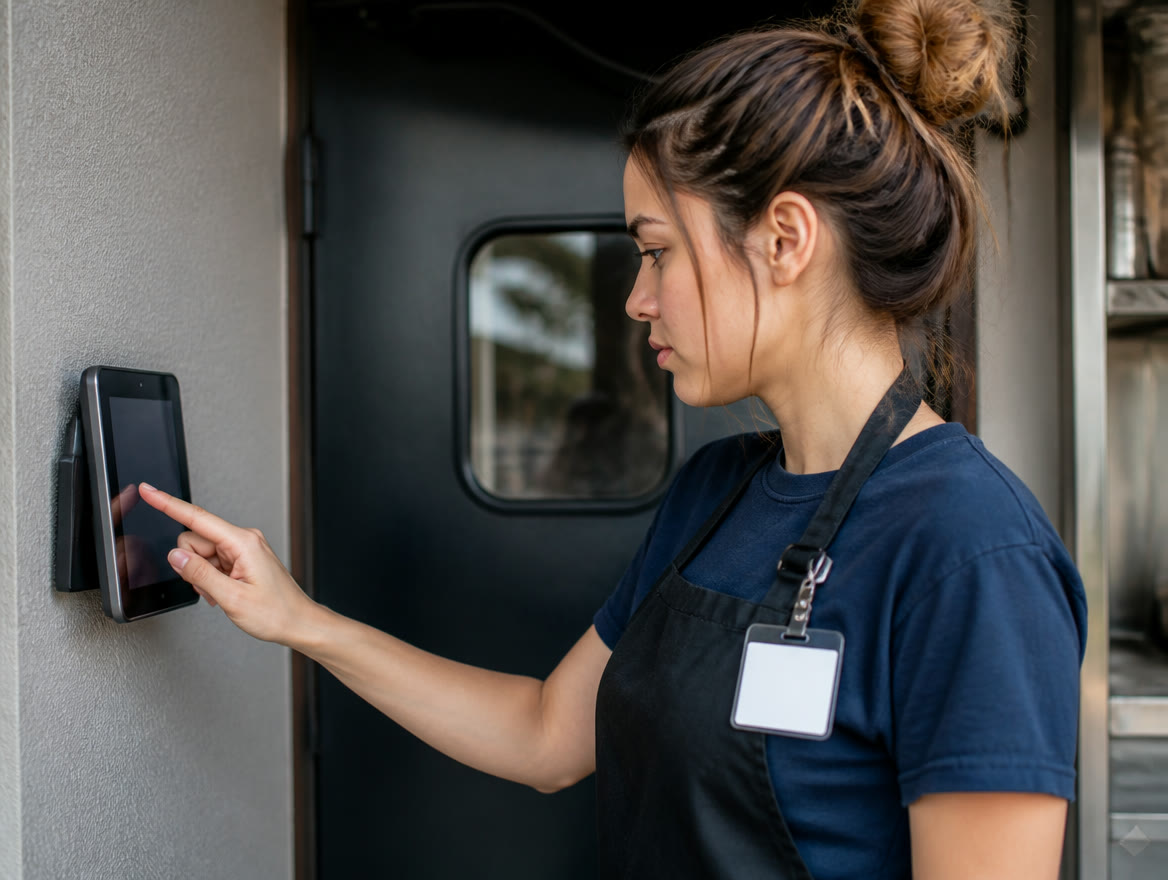
Square Payroll is Square’s online payroll add-on. Per Square’s published pricing (checked October 2026), full-service payroll is $35 a month plus $6 per person paid, and contractor-only payroll is $6 per person paid per month, with unlimited pay runs and no long-term contract. Full-service automates federal and state tax filings and payments and imports timecards and tips from Square POS. Payroll is billed separately from Square’s Free, Plus and Premium plans, and the Square Shifts scheduling and time-clock tools come with Plus or Premium. Prices can change, so confirm current rates with Square.
How much does Square Payroll cost?
Square publishes two payroll prices, checked October 2026. Full-service payroll is $35 a month plus $6 per person paid. Contractor-only payroll is $6 per person paid per month, with no base fee. Both come with unlimited pay runs and no commitment, and you can cancel anytime.
Square’s contractor page puts full-service at “as low as $41 per month” — the $35 base plus one person at $6. These are Square’s prices, not ours, and Square can change them, so check its payroll pricing page before you commit.
Card processing is billed separately (see Square fees explained), and Square Shifts needs Square Plus ($49 a month per location) or Premium ($149). Here’s the arithmetic for a few common setups.
| Business | Setup | Arithmetic | Monthly total |
|---|---|---|---|
| Coffee shop, 1 location | Full-service, 8 employees, Square Free | $35 + (8 × $6) | $83 |
| Same shop, with Shifts | Full-service, 8 employees, Square Plus | $83 + $49 | $132 |
| Remodeling contractor | Contractor-only, 5 subcontractors | 5 × $6 | $30 |
| Taqueria, 2 locations | Full-service, 20 employees, Square Plus at both | $35 + (20 × $6) + (2 × $49) | $253 |
Some costs aren’t published. Square lists workers’ comp, paid amendment services, health insurance and 401(k) as add-ons with no price shown, so get quotes before you count on them. Mailing paper W-2s or 1099s is optional and costs $3 per person per year.
Full-service or contractor-only: which Square Payroll plan fits your team?
If anyone you pay is a W-2 employee, you’re looking at full-service. Contractor-only is built for businesses that pay only 1099 workers.
Full-service is where the tax work lives. Square says it automates federal and state payroll tax filings and payments at no additional charge, handles new-hire reporting, and files W-2s and 1099-NECs each January for the prior year. Whether a worker is an employee or a contractor is a question for your CPA, not your software.
- Pick full-service if: you have W-2 employees, tipped staff, overtime, or deductions and garnishments to handle.
- Pick contractor-only if: everyone you pay is a 1099 contractor and you mainly need payments sent and 1099-NECs filed.
- Mixed crew? Square’s features page says it files both W-2s and 1099-NECs for your team. Ask Square how contractors count toward the per-person fee on full-service.
- Remote hire out of state? Full-service supports multistate payroll, and Square says adding work-from-home locations helps you pay unemployment tax correctly to those employees’ home states. Confirm the details with your CPA.
| Feature | Full-service | Contractor-only |
|---|---|---|
| Published price | $35/mo + $6 per person paid | $6/mo per person paid |
| Unlimited pay runs, no long-term contract | Yes | Yes |
| Direct deposit, check or Cash App | Yes | Yes |
| Automatic payroll tax calculations | Yes | Yes |
| Automated federal and state tax payments and filings | Yes | Not included |
| Timecard import | Yes | Yes |
| Direct-tip import and overtime calculations | Yes | Not included |
| Off-cycle payments and multiple pay rates | Yes | Not included |
| Two-day, four-day and next-day direct deposit timing | Yes | Not included |
| Multistate payroll and new-hire reporting | Yes | Not included |
| Benefit deductions and garnishments | Yes | Not included |
| Health insurance and 401(k) | Add-on | Not included |
| Workers’ comp | Add-on | Add-on |
| QuickBooks Online integration | Yes | Yes |
What is Square Shifts, and do you need Square Plus to use it?
Square Shifts is the scheduling and time-tracking side of Square’s team tools, and it tracks time for both W-2 employees and 1099 contractors.
Shifts has no standalone price. Square includes it in Square Plus ($49/mo. per location) and Square Premium ($149/mo. per location), and each plan has a free 30-day trial, per Square’s pricing page checked October 2026. Square Free doesn’t include the staff-management features.
One wrinkle: Square’s payroll pricing table lists scheduling “up to 10 days out” as part of full-service payroll. For open shifts, swaps and labor-versus-sales reporting, you want Shifts.
- Time clock: staff clock in with a personal passcode at the register, or through the Square Team App away from the POS, with optional geofencing.
- Scheduling: publish and duplicate schedules, post open shifts with swaps, and collect availability and time-off requests.
- Labor-cost control: clock-in protection blocks early or unscheduled clock-ins, and breaks and overtime are tracked.
- Reporting: labor costs, labor versus sales, and team sales.
- Payroll handoff: timecards sync with Square Payroll, or export to a third-party payroll provider.
Square Plus also lowers Square’s published in-person rate from 2.6% + 15¢ to 2.5% + 15¢ and its online/invoice rate from 3.3% + 30¢ to 2.9% + 30¢ (checked October 2026). In-person sales alone cover the $49 fee at about $49,000 a month per location ($49,000 × 0.1%).
How does Square team management handle permissions, tips and commissions?
Advanced Access comes with Plus or Premium and adds unlimited custom permission sets, a team member activity log, a team sales report and team member badges. Square says badges work with Square Reader, Square Register and Square Stand with a built-in reader. Compare Square Register and Stand on our hardware page.
Shifts handles tip pooling, cash tip tracking, commission tracking, and hourly and salary wage types. Team Communication adds chats, announcements and shared files in the Square Team app.
- Restaurants and bars: tip pooling and cash tip tracking live in Shifts, and full-service payroll imports direct tips from Square POS. See Square for Restaurants, and our buying guide on tip handling in a restaurant POS.
- Salons, barbers and spas: commissions are tracked in Shifts and, Square says, automatically in payroll. See Square Appointments.
- Retail shops: permission sets and the activity log help you control and review what happens at the register.
- Field and home services: crews can clock in from the Square Team App away from the register, and their hours sync to payroll. See Square for service businesses.
When do you need to run Square Payroll so your team gets paid on time?
Square says to process payroll by 8 p.m. Pacific for direct deposit to land on payday. In Dallas / Ft. Worth and most of Texas, that’s 10 p.m. Central; in El Paso, 9 p.m. Mountain.
Square’s standard processing window is four business days. You can apply for Two-Day Payroll to cut that to two, and Instant Payments uses money in your Square balance to run payroll as little as one day before payday. Eligible team members who use Cash App can use Instant Deposit; Square’s features page says that means pay two calendar days before the original pay date, in qualifying states. Square’s pricing table lists two-, four- and next-day direct deposit as full-service only, so contractor-only users should confirm payment timing with Square.
| Option | Submit payroll | What it takes |
|---|---|---|
| Standard | Four business days before payday | Default processing window |
| Two-Day Payroll | Two business days before payday | Apply with Square |
| Instant Payments | As little as one day before payday | Funds in your Square balance |
| Cutoff time | 8 p.m. PT (10 p.m. Central) on your submission day | For direct deposit to arrive on payday |
Instant Payments runs on funds in your Square balance. Square says that if your transfer schedule is automatic, sales leave the balance each day and it can’t fund payroll, so you’d switch to manual transfers first. More in Square banking and loans.
How do you set up Square Payroll and Shifts? A step-by-step checklist
Here’s the order to work it in. All nine steps come before your first live payroll, and steps 4–6 are where overtime, tip-pool and permission settings get decided.
Where Lone Star Payments fits: we set up your Square point of sale with you — plan selection, team permissions, tipping and hardware pairing — and train your staff on the time clock, on-site across Dallas / Ft. Worth or remotely with a live specialist statewide. Payroll itself is Square’s service: Square files and pays taxes on full-service, and Square’s payroll specialists support it. See how our Square setup works.
- 1. Pick your Square plan. Want Shifts, tip pooling and custom permissions? Budget for Plus or Premium per location. If not, Square Free plus payroll may do.
- 2. Pick your payroll plan. Full-service for W-2 employees; contractor-only for 1099-only teams.
- 3. Add your team. Square lists employee self-onboarding on both plans, so staff enter their own details.
- 4. Set roles and permissions before the first shift, not after a problem.
- 5. Set wages, tips and commissions: hourly or salary, tip-pool rules, cash tips, commissions.
- 6. Set up the time clock: passcodes or badges at the register, the Team App for staff away from the register, and clock-in protection or geofencing (which ties clock-ins to physical presence) if you want them.
- 7. Publish the first schedule and check timecards, breaks and overtime after a full pay period.
- 8. Choose your pay timing — standard, Two-Day Payroll or Instant Payments — and calendar the submission day.
- 9. Connect QuickBooks Online if that’s where your books live.
Run one full pay period on the time clock before your first live payroll. Catching a wrong overtime rule or tip-pool setting on a practice week costs nothing; catching it after direct deposits go out is a real headache.
Who is Square Payroll a good fit for — and who should look elsewhere?
Square Payroll makes the most sense when Square is already your register. The value is the handoff: with Shifts on Plus or Premium and full-service payroll, hours, tips and commissions land in payroll without anyone retyping them. If that handoff doesn’t matter to you, the case gets weaker — and since we sell several platforms, we’ll say so.
- Good fit: restaurants, cafés, bars, salons and shops already on Square POS, with hourly or tipped staff. Restaurant owners weighing Toast can see how Toast bundles payroll.
- Good fit: small 1099 crews that need contractors paid and 1099-NECs filed.
- Keep what you have if: your CPA or current provider already runs payroll well. Shifts timecards can export to a third-party payroll provider.
- Think twice if: you need evening or weekend payroll help. Square lists payroll support Monday–Friday, 6 a.m.–6 p.m. Pacific (8 a.m.–8 p.m. Central).
- Think twice if: you need firm benefits pricing up front. Health insurance, 401(k) and workers’ comp are add-ons without published prices.
- Do the math if: you run several locations. Plus is $49 a month per location, so Shifts across three stores is $147 a month before payroll.
- Square Payroll is a separate add-on: $35/mo + $6 per person paid for full-service, or $6 per person paid for contractor-only (Square’s published pricing, checked October 2026; confirm current rates).
- Full-service automates federal and state tax filings and payments; contractor-only covers 1099 workers and files 1099-NECs.
- Square Shifts — scheduling, time clock, tip pooling, labor reports — comes with Square Plus ($49) or Premium ($149) per location per month, not Square Free.
- Standard payroll needs four business days; Two-Day Payroll and Instant Payments shorten that on full-service. Submit by 8 p.m. Pacific (10 p.m. Central) on your submission day.
- Lone Star Payments sets up your Square point of sale, permissions and tipping with you and trains your staff, then stays a phone call away; Square runs the payroll and tax filings.
Frequently asked questions
How much does Square Payroll cost per month?
Per Square’s published pricing (checked October 2026), full-service payroll is $35 a month plus $6 per person paid, and contractor-only payroll is $6 per person paid per month. A full-service team of 10 works out to $35 + (10 × $6) = $95 a month. Optional paper W-2/1099 mailing is $3 per person per year, and benefits add-ons aren’t priced publicly. Confirm current prices with Square.
Is Square Payroll included with Square Plus or Square Premium?
No. Square says Payroll is a separate paid add-on and isn’t included in Square Free, Plus or Premium. What Plus ($49/mo. per location) and Premium ($149/mo. per location) do include is the team side — Square Shifts scheduling and timecards, tip pooling, commission tracking and custom permissions — which feeds clean hours into payroll. Those are Square’s published prices, checked October 2026.
Does Square Payroll have a free trial?
Square’s payroll pages don’t mention a free trial for payroll itself. They do say there’s no commitment, unlimited pay runs, and you can cancel anytime. Square Plus and Square Premium, which include Shifts, each offer a free 30-day trial, so you can test scheduling and the time clock before paying for the plan. Confirm current terms with Square when you sign up.
Does Square Payroll file and pay my payroll taxes?
On full-service payroll, yes. Square says it automates federal and state tax filings and payments at no additional charge, handles new-hire reporting, and files W-2s and 1099-NECs each January for the prior tax year. The contractor-only plan files 1099-NECs, but automated tax payments and filings are listed as full-service only. Questions about your own tax situation belong with your CPA.
Does Square Payroll work with QuickBooks?
Yes. Square lists QuickBooks Online integration on both full-service and contractor-only payroll, so payroll data can sync to your books instead of being re-keyed. If you keep payroll with an outside provider, Square Shifts timecards can also be exported to a third-party payroll provider. If your books live somewhere other than QuickBooks Online, confirm with Square how the data will move before you switch.
Can Lone Star Payments help me set up Square Payroll and Shifts?
Yes, for the point-of-sale side. We’ll help you pick the right plan, set team permissions and tipping, pair your hardware, and train your staff on clocking in — on-site across Dallas / Ft. Worth or remotely statewide — and you can call (214) 838-1818 with questions afterward. Payroll enrollment, tax setup and filing happen in your Square account with Square’s payroll specialists, and your Square account stays your Square account.
Get the Time Clock Set Up Before Your First Payday
Call a real person in Dallas / Ft. Worth at (214) 838-1818. We’ll help you choose between Square Free, Plus and Premium, set up team permissions and tipping, train your staff on the time clock, and run a free side-by-side review of Square’s published costs against our other options for your actual card volume.
Square and related marks are trademarks of Block, Inc., used here to identify the products Lone Star Payments offers. Square pricing and features described on this page are Square’s published information as of October 2026 and can change — confirm current terms when you sign up.